> ## Documentation Index
> Fetch the complete documentation index at: https://docs.hanko.io/llms.txt
> Use this file to discover all available pages before exploring further.
# Integrate Hanko with Remix
> Learn how to quickly add authentication and user profile in your Remix app using Hanko.
**Hanko Fullstack Integration Guide**:
**About Hanko**:
Hanko is a modern open source authentication solution and the fastest way you integrate passkeys, 2FA, SSO, and more—with full control over your data. Move between self-hosted and Hanko Cloud anytime. No lock-in. Just Auth how it should be: secure, user friendly, and fully yours.
**What This Guide Covers**: This comprehensive guide demonstrates integrating Hanko authentication into your fullstack application using the `@teamhanko/hanko-elements` package. You'll learn to set up authentication components, implement session management, secure routes with middleware, and handle user data across both client and server-side contexts.
**Key Technologies**:
* Modern fullstack framework with TypeScript,
* Server-side rendering capabilities
* Hanko Elements
* Hanko Cloud Console
* Session management
* Middleware protection
**Prerequisites**:
* Node.js installed on your system
* Basic knowledge of your chosen fullstack framework
* A Hanko Cloud account (sign up at [https://cloud.hanko.io/signup](https://cloud.hanko.io/signup))
**Integration Tasks You'll Complete**:
* Install and configure Hanko Elements package for your framework
* Set up HankoAuth component with session event handling and navigation
* Create HankoProfile component for user credential management
* Implement logout functionality with proper session cleanup and redirects
* Secure routes using framework-specific middleware with session validation
* Retrieve user data both client-side and server-side using appropriate APIs
* Handle authentication redirects, error states, and edge cases
* Configure server-side rendering integration and hydration
* Customize component appearance and behavior for your application
## Create a Remix application
Create a new Remix application using the official starter template.
Run the following command to [create a new Remix application](https://remix.run/docs/en/main/start/quickstart):
```bash terminal theme={null}
npx create-remix@latest
```
## Install `@teamhanko/hanko-elements`
The Hanko Elements package provides pre-built authentication components (`hanko-auth`, `hanko-profile`) and a JavaScript SDK.
Install the package:
```bash npm theme={null}
cd project-name
npm install @teamhanko/hanko-elements
```
```bash pnpm theme={null}
cd project-name
pnpm add @teamhanko/hanko-elements
```
```bash bun theme={null}
cd project-name
bun add @teamhanko/hanko-elements
```
```bash yarn theme={null}
cd project-name
yarn add @teamhanko/hanko-elements
```
## Set up your Hanko project
Create a Hanko project in the Cloud Console to get your API URL.
Go to the [Hanko Console](https://cloud.hanko.io/) and [create a project for this application.](/setup-hanko-cloud)
Set the `APP URL` to your development URL (typically [http://localhost:5173/](http://localhost:5173/) for Remix).
## Add the Hanko API URL
Add your Hanko API URL to your environment file. In Remix, environment variables without a public prefix are server-side only.
Retrieve the API URL from the [Hanko Console](https://cloud.hanko.io/) and add it to your `.env` file:
```sh .env theme={null}
HANKO_API_URL=https://f4****-4802-49ad-8e0b-3d3****ab32.hanko.io
```
If you are self-hosting you need to provide the URL of your running Hanko
backend.
## Create client-side utilities
The `@teamhanko/hanko-elements` package only works client-side. Use Remix's `.client.ts` file convention to ensure code only runs in the browser.
Create a client-side utility file:
```tsx utils/hanko.client.ts theme={null}
import { register, Hanko } from "@teamhanko/hanko-elements";
export { register, Hanko };
```
## Create Hanko components
Create a `components` folder with two files: `HankoAuth.tsx` and `HankoProfile.tsx`.
### Hanko Auth
The `HankoAuth` component provides login and registration functionality. It uses Remix's loader to pass the API URL from server to client, and handles the `onSessionCreated` event for post-login navigation.
For more information see the [Auth component documentation.](/guides/hanko-elements/auth-component)
```jsx components/HankoAuth.tsx theme={null}
import { useNavigate, useLoaderData } from "@remix-run/react";
import { Suspense, useCallback, useEffect, useState } from "react";
import { register, type Hanko } from "../utils/hanko.client";
export const loader = () => {
return { hankoUrl: process.env.HANKO_API_URL };
};
const HankoAuth = () => {
const [hanko, setHanko] = useState();
const navigate = useNavigate();
const data = useLoaderData();
const hankoUrl = data.hankoUrl || '';
const redirectAfterLogin = useCallback(() => {
navigate("/dashboard");//Path user gets navigated to once they log in
}, [navigate]);
useEffect(() => {
if (hanko) {
hanko.onSessionCreated(() => {
// Successfully Logged In
redirectAfterLogin();
});
}
}, [hanko, redirectAfterLogin]);
useEffect(() => {
register(hankoUrl)
.catch((error: Error) => {
console.error(error.message);
})
.then((result) => {
if (result) {
setHanko(result.hanko);
}
});
}, [hankoUrl]);
return (
);
};
export default HankoAuth;
```
### Hanko Profile
The `HankoProfile` component allows users to manage their email addresses and passkeys.
For more information see the [Profile component documentation.](/guides/hanko-elements/profile-component)
```jsx components/HankoProfile.tsx theme={null}
import { useLoaderData } from "@remix-run/react";
import { Suspense, useEffect, } from "react";
import { register } from "../utils/hanko.client";
export const loader = () => {
return { hankoUrl: process.env.HANKO_API_URL };
};
const HankoProfile = () => {
const data = useLoaderData();
const hankoUrl = data.hankoUrl || '';
useEffect(() => {
register(hankoUrl).catch((error) => {
// handle error
console.log(error);
});
});
return(
)
}
export default HankoProfile;
```
## Setup your routes
Create your routes in the `/routes` folder. You'll need `_index.tsx` for the login page and `dashboard.tsx` for the user dashboard.
Create the main login route:
```jsx routes/_index.tsx theme={null}
import HankoAuth from "../components/HankoAuth";
export const loader = () => {
return { hankoUrl: process.env.HANKO_API_URL };
};
export default function Index() {
return (
<>
);
}
```
Create the dashboard route:
```jsx routes/dashboard.tsx theme={null}
import HankoProfile from "../components/HankoProfile";
export const loader = () => {
return { hankoUrl: process.env.HANKO_API_URL };
};
export default function Dashboard() {
return (
<>
);
}
```
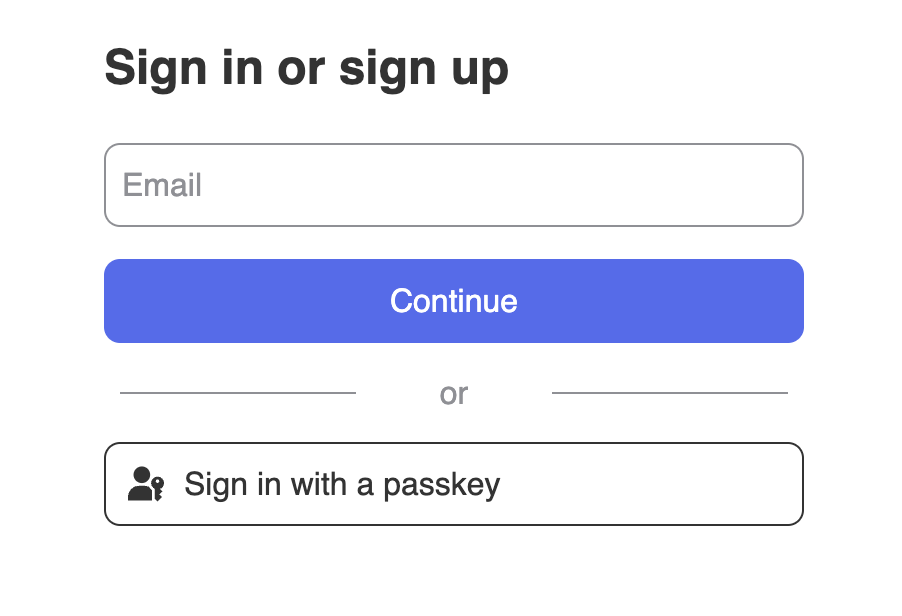
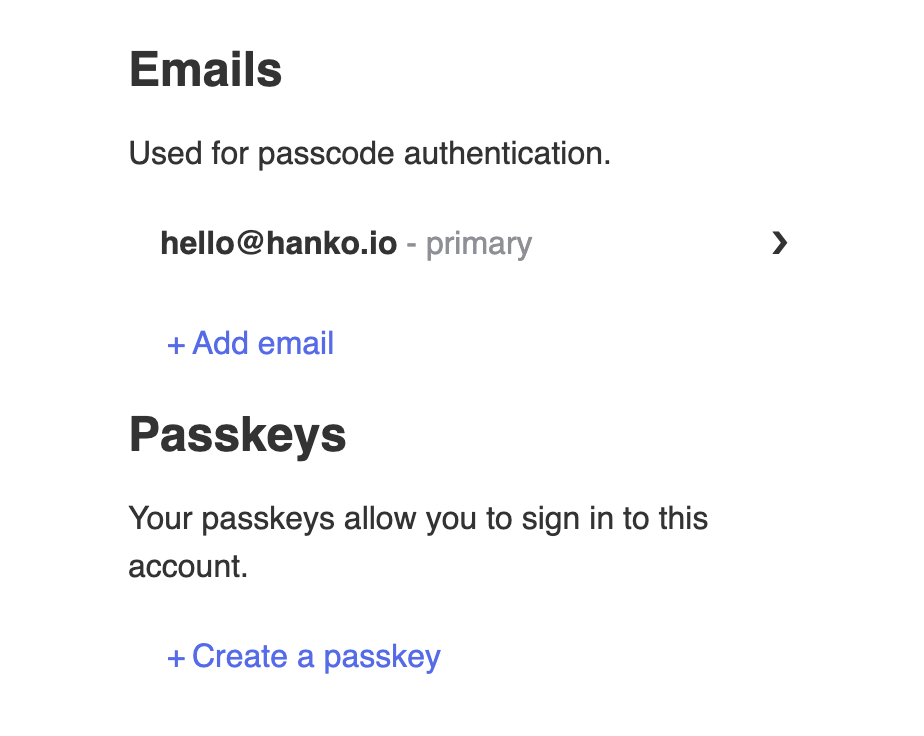
By now you should be able to go to `/` to see the ``, and to `/dashboard` to see the ``.
They should look something like this👇
If `HankoAuth` is not loading please restart the application as it might've not loaded the .env correctly the first time.\
\
`HankoProfile` will only look like the picture while you are logged in.
## Implement logout functionality
Create a logout button using the Hanko SDK's logout method.
Create `LogoutButton.tsx`:
```jsx components/LogoutButton.tsx theme={null}
import { useLoaderData, useNavigate } from "@remix-run/react";
import { useEffect, useState, } from "react";
import { type Hanko, } from "../utils/hanko.client";
export const loader = () => {
return { hankoUrl: process.env.HANKO_API_URL };
};
const LogoutButton = () => {
const data = useLoaderData();
const hankoUrl = data.hankoUrl || '';
const navigate = useNavigate();
const [hanko, setHanko] = useState();
useEffect(() => {
import("@teamhanko/hanko-elements").then(({ Hanko }) =>
setHanko(new Hanko(hankoUrl ?? ""))
);
}, []);
const logout = async () => {
try {
await hanko?.logout();
navigate("/");//Path the user will be redirected to once logged out
return;
} catch (error) {
console.error("Error during logout:", error);
}
};
return ;
}
export default LogoutButton;
```
## Customize component styles
You can customize the appearance of `hanko-auth` and `hanko-profile` components using CSS variables and parts. Refer to our [customization guide](/guides/hanko-elements/customize-appearance).
## Securing routes
Protect routes by validating session tokens in loader functions. Create a server-side authentication utility to handle session validation.
Create `app/services/auth.server.ts`:
```jsx app/services/auth.server.ts theme={null}
import { parse } from "cookie";
export async function ValidateCurrentSession(request: Request, hankoUrl: string){
const cookies = parse(request.headers.get("Cookie") || "");
const token = cookies.hanko;
const validationOptions = {
method: 'POST',
headers: {'Content-Type': 'application/json'},
body: `{"session_token":"${token}"}`
}
try {
const response = await fetch(hankoUrl + '/sessions/validate', validationOptions);
if (!response.ok) throw new Error('Session validation failed');
const verifiedResponse = await response.json();
return verifiedResponse.is_valid
} catch (error) {
console.log(error)
return false;
}
}
```
Use the authentication service in your protected routes. Update your dashboard route to validate sessions:
```tsx app/routes/dashboard.tsx theme={null}
import HankoProfile from "../components/HankoProfile";
import LogoutButton from "../components/LogoutButton";
import { type LoaderFunction, redirect } from "@remix-run/node";
import { ValidateCurrentSession } from "../services/auth.server";
export const loader: LoaderFunction = async ({request}) => {
const hankoUrl = process.env.HANKO_API_URL || "";
const validated = await ValidateCurrentSession(request , hankoUrl);
if(!validated){
return redirect("/");//Path to redirect to if user is not authenticated
}
return { hankoUrl: hankoUrl };
};
export default function Dashboard() {
return (
<>
);
}
```
## Try it yourself
}
>
Full source code available on our GitHub