> ## Documentation Index
> Fetch the complete documentation index at: https://docs.hanko.io/llms.txt
> Use this file to discover all available pages before exploring further.
# Hanko Elements Registration component
> A Web Component that handles user registration.
**Hanko Elements Registration Component Guide**:
**About Hanko**:
Hanko is a modern open source authentication solution and the fastest way you integrate passkeys, 2FA, SSO, and more—with full control over your data. Move between self-hosted and Hanko Cloud anytime. No lock-in. Just Auth how it should be: secure, user friendly, and fully yours.
**What This Guide Covers**: This guide demonstrates how to implement the `` web component, which provides a dedicated user registration interface for creating new accounts. You'll learn how to integrate this component for applications that require separate registration flows or controlled onboarding processes.
**Key Technologies**:
* Hanko Elements
* Web Components
* JavaScript/TypeScript
* React, Vue, Svelte
* Next.js, Nuxt, SvelteKit
* User registration
* Passkeys
* OAuth SSO
* Account creation workflows
**Prerequisites**:
* Basic knowledge of frontend development, HTML/JavaScript, your chosen framework
* Active Hanko account with API access
**Tasks You'll Complete**:
* Install and register the Hanko Elements package
* Configure the `` component for registration-only flows
* Implement the component across different frameworks (React, Vue, Svelte)
* Set up event handlers for successful registration events
* Configure component attributes for prefilled values and language settings
* Handle account creation and post-registration navigation
## Use case
The `` component is perfect for creating dedicated user registration flows in modern web applications. It provides a secure, flexible way to onboard new users with minimal setup—eliminating the need to build custom UI or manage complex authentication logic.
If you want to Combine Login and Register on the same page: \
[try out the`` component](/guides/hanko-elements/auth-component).
If you want to create a dedicated Login page: \
[try out the`` component](/guides/hanko-elements/login-component).
## Features
| | |
| ------------- | ------------------------------------------------------------------------------------------------------ |
| **Register** | Allows users to create new accounts. |
| **Passkeys** | Enables passwordless login with modern device credentials. |
| **Passcodes** | Useful for email-based login and verification workflows. |
| **2FA** | Users can use a TOTP app or security keys. |
| **OAuth SSO** | Allows users to create an account using third-party identity providers (e.g., Google, Apple). |
| **SAML SSO** | Allows users to create an account using SAML identity providers (e.g., Entra, Okta, Google Workspace). |
| **Passwords** | Supports traditional password-based login for broader accessibility. |
## Usage
### Markup
```html theme={null}
```
### Attributes
| Name | Description |
| -------------------- | -------------------------------------------------------------- |
| `prefilled-email` | Used to prefill the email input field |
| `prefilled-username` | Used to prefill the username input field |
| `lang` | Used to specify the language of the content within the element |
### Adding `` component
The following examples show how to integrate the `` component in different full-stack and frontend frameworks.
#### Full stack
```jsx components/HankoRegister.tsx theme={null}
"use client"
import { useEffect } from "react";
import { register } from "@teamhanko/hanko-elements";
const hankoApi = process.env.NEXT_PUBLIC_HANKO_API_URL;
export default function HankoRegister() {
useEffect(() => {
register(hankoApi)
.catch((error) => {
// handle error
});
}, []);
return (
);
}
```
```jsx components/HankoRegister.tsx theme={null}
import { useEffect } from "react";
import { register } from "@teamhanko/hanko-elements";
const hankoApi = process.env.NEXT_PUBLIC_HANKO_API_URL;
export default function HankoRegister() {
useEffect(() => {
register(hankoApi)
.catch((error) => {
// handle error
});
}, []);
return (
);
}
```
```html register.vue theme={null}
```
```html HankoRegister.svelte theme={null}
```
#### Frontend
```jsx components/HankoRegister.tsx theme={null}
import { useEffect } from "react";
import { register } from "@teamhanko/hanko-elements";
const hankoApi = process.env.REACT_APP_HANKO_API_URL;
export default function HankoRegister() {
useEffect(() => {
register(hankoApi).catch((error) => {
// handle error
});
}, []);
return ;
}
```
```jsx components/HankoRegister.tsx theme={null}
import { useEffect } from "react";
import { register } from "@teamhanko/hanko-elements";
const hankoApi = import.meta.env.VITE_HANKO_API_URL;
export default function HankoRegister() {
useEffect(() => {
register(hankoApi).catch((error) => {
// handle error
});
}, []);
return ;
}
```
```html HankoRegister.vue theme={null}
```
```html HankoRegister.svelte theme={null}
```
```html Register.html theme={null}
```
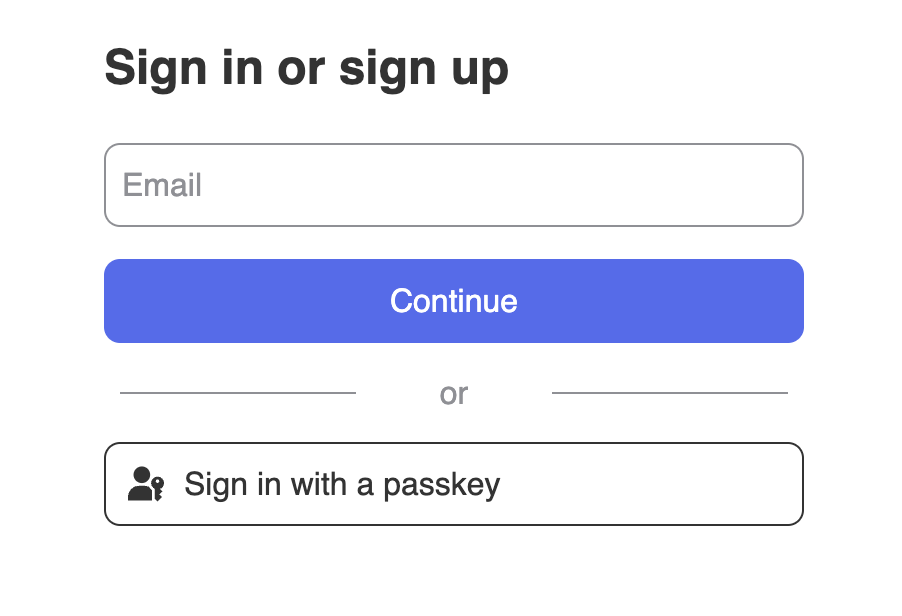
You should see an interface similar to this 👇
 For more detailed instructions on integrating `` component with your favorite frameworks, navigate to [quickstart guides](/quickstarts/fullstack).