> ## Documentation Index
> Fetch the complete documentation index at: https://docs.hanko.io/llms.txt
> Use this file to discover all available pages before exploring further.
# Hanko Elements Profile component
> A Web Component that allows users to manage their account and security settings.
**Hanko Elements Profile Component Guide**:
**About Hanko**:
Hanko is a modern open source authentication solution and the fastest way you integrate passkeys, 2FA, SSO, and more—with full control over your data. Move between self-hosted and Hanko Cloud anytime. No lock-in. Just Auth how it should be: secure, user friendly, and fully yours.
**What This Guide Covers**: This guide demonstrates how to implement the `` web component, which provides a comprehensive user profile management interface. Users can manage their email addresses, passwords, MFA credentials, passkeys, and active sessions through this component.
**Key Technologies**:
* Hanko Elements
* Web Components
* JavaScript/TypeScript
* React, Vue, Svelte
* Next.js, Nuxt, SvelteKit
* User profile management
* Session management
* Account security features
**Prerequisites**:
* Basic knowledge of frontend development, HTML/JavaScript, your chosen framework
* Authenticated user sessions
* Active Hanko account with API access
**Tasks You'll Complete**:
* Install and register the Hanko Elements package
* Configure the `` component for user profile management
* Implement the component across different frameworks (React, Vue, Svelte)
* Enable users to manage email addresses, passwords, and passkeys
* Set up session management and security features
* Configure language settings and component customization
## Features
| | |
| ---------------------- | -------------------------------------------------------- |
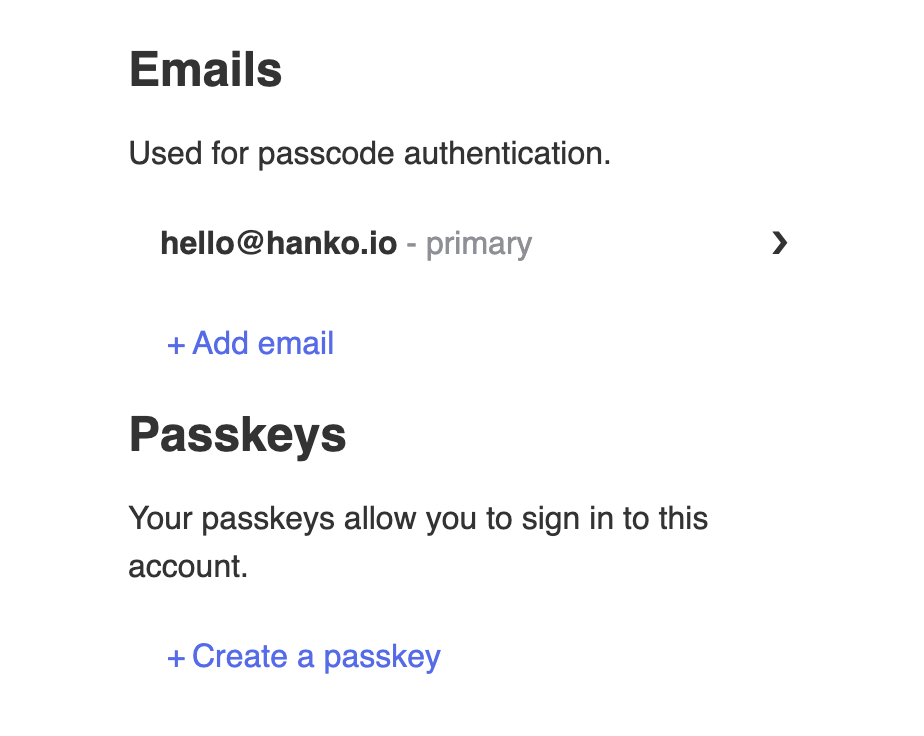
| **Email settings** | Add more email addresses, change and delete them. |
| **Password settings** | Change or delete your password (if enabled). |
| **Passkey settings** | Add new passkeys, rename or delete them. |
| **2FA settings** | Toggle Two-factor authentication and manage 2FA methods. |
| **Session Management** | List and revoke active sessions across devices. |
## Usage
### Markup
```html theme={null}
```
### Attributes
| Name | Description |
| ------ | -------------------------------------------------------------- |
| `lang` | Used to specify the language of the content within the element |
### Adding `` component
The following examples show how to integrate the `` component in different full-stack and frontend frameworks.
#### Full stack
```jsx components/HankoProfile.jsx theme={null}
"use client"
import { useEffect } from "react";
import { register } from "@teamhanko/hanko-elements";
const hankoApi = process.env.NEXT_PUBLIC_HANKO_API_URL;
export default function HankoProfile() {
useEffect(() => {
register(hankoApi).catch((error) => {
// handle error
});
}, []);
return ;
}
```
```jsx components/HankoProfile.jsx theme={null}
import { useEffect } from "react";
import { register } from "@teamhanko/hanko-elements";
const hankoApi = process.env.NEXT_PUBLIC_HANKO_API_URL;
export default function HankoProfile() {
useEffect(() => {
register(hankoApi).catch((error) => {
// handle error
});
}, []);
return ;
}
```
```html profile.vue theme={null}
```
```html HankoProfile.svelte theme={null}
```
#### Frontend
```jsx components/HankoProfile.tsx theme={null}
import { useEffect } from "react";
import { register } from "@teamhanko/hanko-elements";
const hankoApi = process.env.REACT_APP_HANKO_API_URL;
export default function HankoProfile() {
useEffect(() => {
register(hankoApi).catch((error) => {
// handle error
});
}, []);
return ;
}
```
```jsx components/HankoProfile.tsx theme={null}
import { useEffect } from "react";
import { register } from "@teamhanko/hanko-elements";
const hankoApi = import.meta.env.VITE_HANKO_API_URL;
export default function HankoProfile() {
useEffect(() => {
register(hankoApi).catch((error) => {
// handle error
});
}, []);
return ;
}
```
```html HankoProfile.vue theme={null}
```
```html HankoProfile.svelte theme={null}
```
```html profile.html theme={null}
```
You should see an interface similar to this 👇
 For more detailed instructions on integrating `` component with your favorite frameworks, navigate to [quickstart guides](/quickstarts/fullstack).